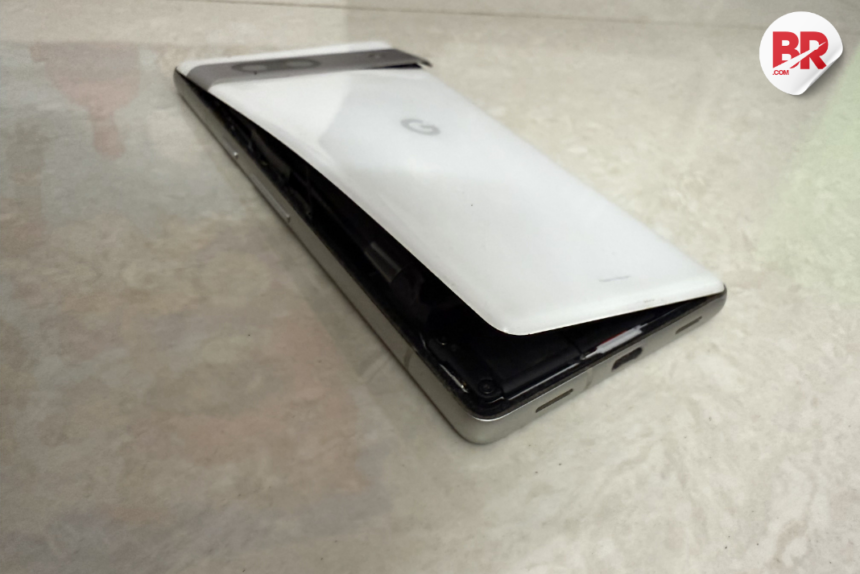
So, here’s the thing. You’re not alone. If your Pixel 7a started to bulge like it’s been hitting the gym, chances are, your phone isn’t the only one. Google’s finally addressing a growing issue: swollen batteries in the Pixel 7a. And, let’s be real – this isn’t just a minor inconvenience; it’s a serious concern.
The Problem: Pixel 7a Batteries Swelling Up
Picture this: you’re going about your day when you notice your Pixel 7a’s back panel is bulging out. The screen’s separating, and the back feels like it’s about to pop. Yep, a swollen battery issue. It’s been happening to quite a few users, and Google’s decided to step in with a solution.
Imagine being on the go, only to discover that your phone could potentially be a fire hazard. It sounds dramatic, but it’s real. Swollen batteries can sometimes lead to dangerous situations. Luckily, Google’s got our backs with a battery replacement program. But, how does it work?
Google’s Battery Replacement Program: Here’s How It Works
Good news! Google’s now offering a free battery replacement for affected Pixel 7a devices. Here’s how you can get in on it:
- Check Your Warranty: First, check if your phone is still under warranty. Google’s program might extend beyond the standard warranty period for certain cases, but it’s worth checking.
- Reach Out to Google Support: The most straightforward way to confirm eligibility is by contacting Google Support. You can do this via their website or the Pixel Tips app.
- Describe the Problem: When contacting support, be clear about the issue you’re facing. If your phone’s back panel is bulging or the screen is separating, mention that. The more detail you give, the better.
- Replacement Process: If your phone qualifies, Google will provide instructions on how to replace the faulty battery.
Also Read The Pixel 9a: How Its AI Features Work with Limited RAM?
What’s Causing the Pixel 7a Battery to Swell?
So, why are these batteries swelling up in the first place? Well, there isn’t a single answer, but here are some of the likely culprits:
- Age and Usage: Over time, lithium-ion batteries degrade. This can cause chemical reactions inside the battery that produce gas, which leads to swelling.
- Overcharging: If you’re leaving your phone plugged in after it’s fully charged, it can accelerate the degradation of the battery, causing it to swell.
- Heat Exposure: In places like India, the summer heat can put a serious strain on your phone’s battery. If your Pixel 7a gets too hot, that could contribute to swelling.
- Manufacturing Defects: Sometimes, it’s just a bad batch of batteries. Manufacturing defects can cause premature failure.
What to Do if You Spot a Swollen Battery
If you notice your Pixel 7a showing signs of a swollen battery, it’s important to take immediate action. Here’s what to do:
- Stop Using the Phone: Don’t try to keep using it. A swollen battery can be unstable.
- Power It Off: If possible, turn the phone off. Don’t force it if it’s hard to do.
- Handle with Care: Avoid squeezing, bending, or poking the phone. Treat it gently.
- Contact Google Support: Get in touch with Google right away to start the replacement process.
- Store It Safely: Until you can get a replacement, store your phone in a cool, fireproof place – away from anything flammable.
Also Read Google Pixel 9a’s 5G Gamble: Exynos 5300 Modem Sparks Concerns
Why It’s Especially Important in India
In countries like India, where temperatures can soar, this issue becomes even more critical. Many Pixel 7a users face the added challenge of heat-related battery damage. Plus, the Pixel 7a is a popular device in India, which means a lot of people could be affected by this issue. Google’s quick action with this replacement program is a big win for everyone dealing with it.
The Bottom Line: Stay Safe and Get That Replacement
If you’ve noticed a swollen battery in your Pixel 7a, don’t wait around. Contact Google Support and take advantage of the battery replacement program before it gets worse. It’s a relief to know that Google is stepping up, especially since this could’ve been a bigger disaster if left unchecked.